Troubleshoot VEP RFID Tag Not Working: A Guide for Singapore Drivers
Written and reviewed by the Radiant VEP Solutions team.
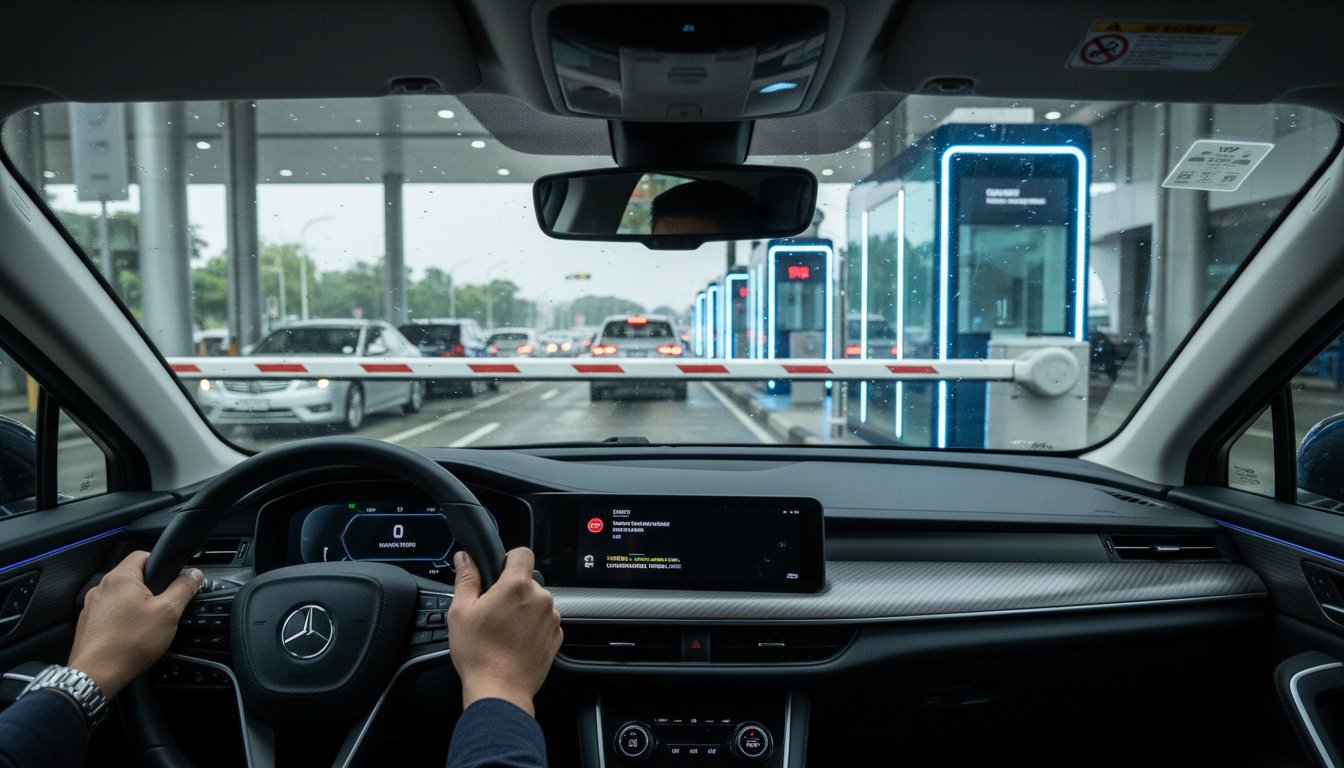
Last Friday, Mr. Tan discovered the true meaning of border stress when his RFID tag failed at the Tuas gantry, leaving him stuck with a 30-car queue mounting behind him. It's a nightmare scenario that many Singaporean drivers face, especially when the official JPJ portal offers little more than a...
Last Friday, Mr. Tan discovered the true meaning of border stress when his RFID tag failed at the Tuas gantry, leaving him stuck with a 30-car queue mounting behind him. It's a nightmare scenario that many Singaporean drivers face, especially when the official JPJ portal offers little more than a "contact support" loop. We understand that you just want a system that works so you can avoid the hassle of manual payments and angry glares from other motorists. If you need to troubleshoot vep rfid tag not working, you're looking for a fast, expert solution that gets you back on the road without the headache.
At Radiant VEP Solutions, we've helped over 5,000 drivers navigate these technical hurdles with ease. We'll help you master the exact steps to diagnose and fix your tag errors, ensuring your next crossing is completely seamless. This guide explains how to check if your car's solar film is the culprit, how to verify your TNG eWallet sync, and the simple process for securing a S$35 replacement if your hardware has finally given up. You'll gain the clarity needed to handle any gantry glitch like a pro.
Key Takeaways
- Learn the essential "no-reverse" protocol and how to request a manual scan to keep traffic moving when your tag fails at the gantry.
- Master how to troubleshoot vep rfid tag not working by identifying signal-blocking metallic tints and choosing the right placement between your headlamp and windscreen.
- Avoid the "low balance" trap and linkage errors by verifying your TNG eWallet settings to ensure your tag is always active for the Woodlands or Tuas crossing.
- Get a clear roadmap for de-registering faulty tags and securing a replacement without the typical administrative hassle.
- Discover how expert start-to-finish assistance can eliminate the stress of DIY fixes and settle your VEP issues once and for all.
Table of Contents
- Immediate Steps: What to Do When Your VEP RFID Tag Fails at the Gantry
- Diagnosing Physical Interference: Why Your RFID Tag Isn't Scanning
- Beyond the Sticker: Solving TNG eWallet and Account Linkage Issues
- The VEP Replacement Process: How to Fix a Permanently Faulty Tag
- Solving the VEP Headache: Let Radiant VEP Solutions Handle the Hassle
Immediate Steps: What to Do When Your VEP RFID Tag Fails at the Gantry
Stalling at the Woodlands or Tuas checkpoint because the barrier won't lift is a major source of stress for Singaporean drivers. If you need to troubleshoot vep rfid tag not working while you're physically in the lane, the first rule is simple: stay calm. Never attempt to reverse your vehicle into the queue. Reversing at the checkpoint is dangerous and can lead to immediate intervention from Malaysian authorities or the LTA. It's much faster to resolve the issue while stationary than to cause a traffic incident.
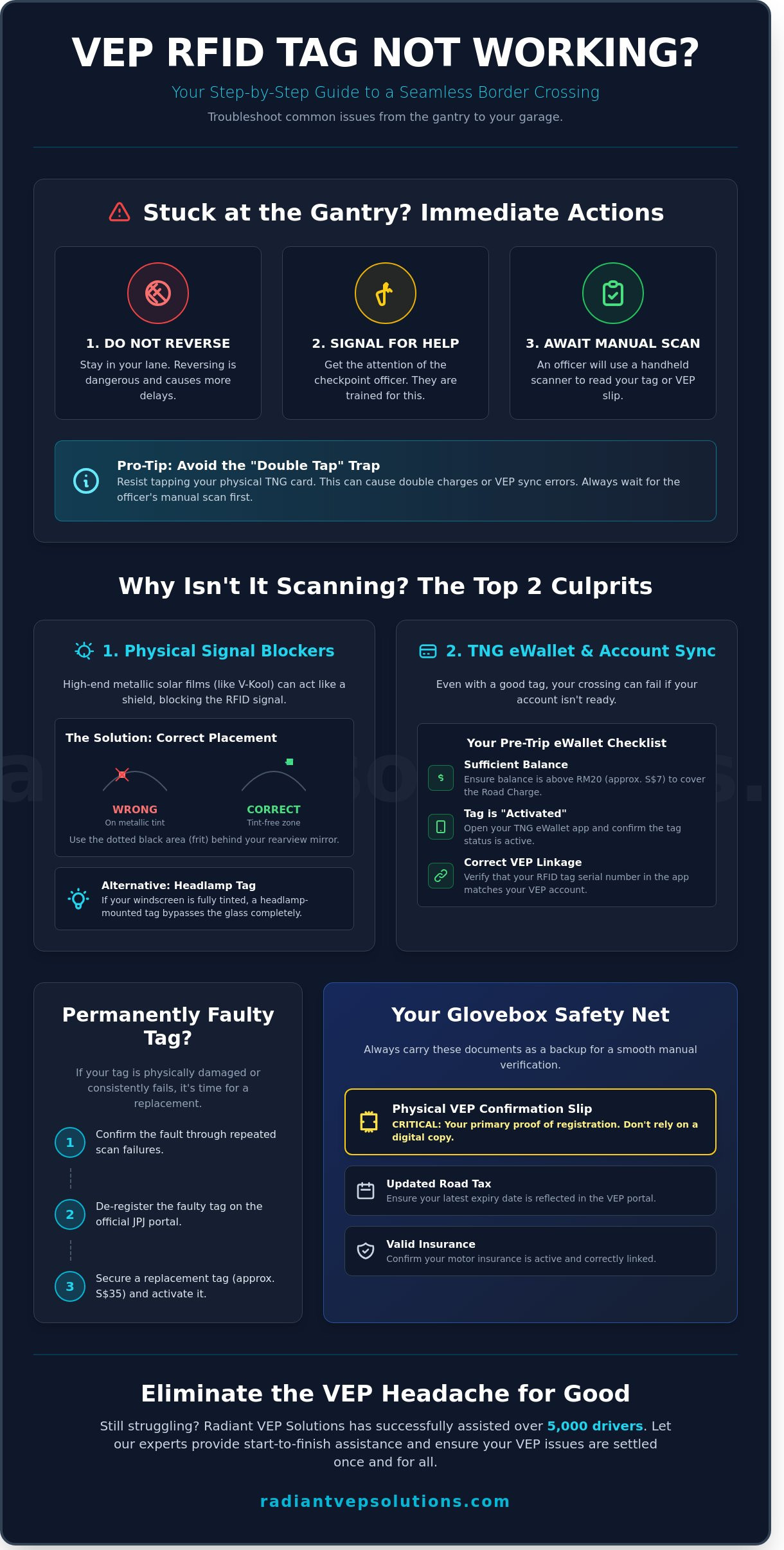
Stay in your lane and signal for the checkpoint officer. These staff members are trained to handle technical glitches and usually carry handheld scanners to perform a manual check of your tag. While waiting, quickly check your Touch 'n Go eWallet balance on your phone. A balance below S$10 is a frequent cause of entry failure, as the system may reject the vehicle if it can't cover the immediate Road Charge (RC) of RM20. If your balance is sufficient and the tag still fails, the officer will rely on your secondary proof of registration.
Handling the 'RFID Not Detected' Error
The barrier often stays down due to signal interference or poor tag placement rather than a total system failure. When you communicate with staff at the checkpoint, clearly state that your tag is valid but not reading. Avoid the common 'Double Tap' mistake. Many drivers try to tap their physical TNG card immediately when the RFID fails, but this can complicate your VEP status. Using a card as a backup can sometimes lead to double deductions or sync errors between your vehicle's RFID profile and the TNG system. Wait for the officer to scan your tag manually to ensure the entry is logged correctly under your VEP account.
Essential Backup Documents to Carry
Since the October 1, 2024 enforcement, the VEP Confirmation Slip has become your most important backup document. It acts as your primary proof of registration when hardware fails. While keeping a digital copy on your phone is convenient, a physical printout is highly recommended. It eliminates delays caused by poor mobile reception or battery issues at the border. To ensure a smooth journey, verify these details before you leave:
- Physical VEP Confirmation Slip: Keep this in your glove box at all times.
- Updated Road Tax: Ensure your latest road tax expiry date is reflected in the VEP portal.
- Insurance Validity: Your motor insurance must be active and correctly linked to your vehicle profile.
- TNG eWallet Link: Confirm your tag is successfully "Activated" in the eWallet app.
At Radiant VEP Solutions, we've helped over 5,000 drivers manage these technical hurdles. If you continue to troubleshoot vep rfid tag not working without success, it may indicate a faulty tag or a deeper synchronization issue in the JPJ database that requires professional attention.
Diagnosing Physical Interference: Why Your RFID Tag Isn't Scanning
Dealing with a barrier that refuses to lift at the JB checkpoint is a major headache. If you're trying to troubleshoot vep rfid tag not working, the first thing to inspect is the physical environment of your vehicle. Most scan failures aren't caused by system glitches but by simple physics. Radio frequency signals are delicate, and even a small piece of metal or the wrong mounting angle can lead to a "Tag Not Detected" error.
The Impact of Premium Solar Films (Tints)
Singaporean drivers often install high-spec solar films like V-Kool or Huper Optik to combat the tropical heat. While these films are excellent for comfort, many contain metallic particles that act as a Faraday cage. This metallic shield blocks the 920MHz to 925MHz frequency used by the VEP sensors. If your tint has a heat rejection rate of 90% or higher, it's likely interfering with your signal.
You can identify the best spot for your tag by looking for the "tint-free" zone. Most car manufacturers leave a small, dotted black area (the ceramic frit) behind the rearview mirror specifically for ERP units and RFID tags. Testing your tag in this zone often solves the problem instantly. If your entire windscreen is covered in heavy metallic film, you should consider a headlamp-mounted tag instead. This bypasses the glass entirely and provides a clear line of sight to the overhead scanners.
Physical Tag Maintenance and Longevity
Your RFID tag is a piece of precision electronics, not just a sticker. It contains a thin silver antenna that can be easily damaged. Look closely for any signs of bubbling, peeling edges, or tiny cracks across the center of the tag. A single 2mm scratch through the antenna circuit is enough to render the tag useless.
The 'dead zone' for RFID placement on SG car windscreens is the 5cm perimeter nearest to the metal A-pillar where signal reflection causes the most frequent scan failures.
- Avoid Harsh Chemicals: When washing your car, don't use acidic cleaners or high-pressure jets directly on the tag. These can corrode the silver inlay.
- Check for Bubbles: Air gaps between the tag and the glass can refract the signal, leading to intermittent reads.
- Distance and Height: SUV drivers should mount tags slightly lower than sedan drivers. Because an SUV sits 30cm to 40cm higher, a tag placed at the very top of the windscreen might be outside the scanner's optimal 45-degree read angle.
If you've checked these physical factors and the barrier still won't budge, it's possible your tag was never properly activated in the database. For a quick resolution, you can consult with a VEP specialist to verify your tag's status and ensure your next trip across the border is hassle-free. Taking five minutes to inspect your tag today can save you an hour of frustration in the touch-and-go lane tomorrow.
Beyond the Sticker: Solving TNG eWallet and Account Linkage Issues
Your VEP tag might be perfectly pasted, but if the digital link is broken, the gantry stays down. This "invisible" failure is a major reason drivers need to troubleshoot vep rfid tag not working. The connection between the Malaysian JPJ portal and your TNG eWallet must be seamless for the system to process payments in real-time. If there is a data mismatch, the hardware becomes useless.
The Digital Handshake: VEP Portal vs. TNG App
First, log into the official JPJ VEP portal to verify your tag status. It must display as "Activated." If it still shows "Pending," the RFID reader at the CIQ won't recognize your vehicle. We've seen cases where a VRN (Vehicle Registration Number) mismatch of just one letter causes the "Vehicle Not Found" error in the eWallet interface. Ensure your car plate matches the Tag ID exactly. Accuracy is the only way to avoid this common headache.
- Sync Delays: New tags typically require 24 to 48 hours to "go live" digitally across all systems.
- Account Linkage: Your TNG eWallet must be registered with the same Passport or NRIC number used in the VEP portal.
- Multiple Vehicles: You can manage up to 10 vehicles under one eWallet, but each must be individually activated and linked through the "RFID" section of the app.
If you recently changed your vehicle or transferred ownership, the old tag must be deregistered first. Leaving an old link active can confuse the TNG system, leading to failed transactions at the border. It's a simple step that saves a lot of frustration at the gantry.
Auto-Reload and Low Balance Errors
The "Low Balance" trap catches many Singaporean drivers off guard. Even if your toll is only a few dollars, the system may reject tags if the balance is too close to zero. We recommend maintaining a minimum of S$20 in your eWallet at all times. This provides a safe buffer for both the Road Charge (RC) and subsequent highway tolls. A low balance is a frequent culprit when you troubleshoot vep rfid tag not working at the point of entry.
Setting up Auto-Reload with a Singapore-issued credit card is the most efficient way to avoid this issue. Most major cards from banks like OCBC, UOB, or DBS work, provided they allow international transactions. If your eWallet becomes inactive or suspended due to lack of use, the RFID tag will fail immediately. This often happens to drivers who haven't crossed the border in over 180 days. To fix this, perform a manual top-up of at least S$10 to reactivate the account status before you reach the checkpoint.
The VEP Replacement Process: How to Fix a Permanently Faulty Tag
Sometimes, even the best efforts to troubleshoot vep rfid tag not working lead to the same conclusion: the hardware is dead. If your tag shows visible signs of peeling, sun damage, or cracking, it's time to stop struggling and start the replacement process. A faulty tag isn't just a minor inconvenience; it can lead to significant delays at the CIQ or even potential fines if you're caught without a functioning VEP after the enforcement deadlines. Most tags have a lifespan of 3 to 5 years, but Singapore’s intense heat can shorten that window considerably.
De-registering Your Old VEP Tag
Before you can stick a new tag on your windscreen, you must clear the old one from the system. Log into the official JPJ VEP portal and navigate to the 'Vehicle List' section. You'll find a 'Deregister' button next to your vehicle registration number (VRN). This step is non-negotiable. If you don't deregister, the system will block any new applications for the same car. For those who bought a second-hand car with an existing tag, the process requires a bit more effort. You'll need to upload the sales agreement or log card to prove ownership change, as the previous owner's data remains locked to that VRN.
- Processing Time: It typically takes 2 to 3 working days for the system to update after you click deregister.
- Confirmation: Don't apply for a new tag until you receive the official email confirmation that the old record is cleared.
- Accuracy: Ensure your TNG eWallet is still linked to the same account to keep your balance accessible.
Collecting and Installing Your New Tag
You don't have to drive across the causeway just to get a new tag. There are now efficient VEP Collection Centres right here in Singapore. Popular spots include the centres at 110 Woodlands Industrial Park E3 and 80 Genting Lane. Booking an appointment is mandatory. Walk-ins are rarely entertained and often lead to wasted trips. To ensure a "one-trip" fix, bring your NRIC, a printed copy of your latest LTA vehicle log card, and your appointment confirmation slip. These documents are essential for the staff to verify your identity and vehicle details on the spot.
The cost for a replacement tag is S$10, but you should budget for additional service fees. Most Singapore-based centres charge a total of S$30 to S$50, which covers the tag, the administrative processing, and professional installation. While DIY installation is possible, we strongly recommend a pro-install. Specialists use RFID signal testers to find the exact "sweet spot" on your headlamp or windscreen. This precision prevents you from having to troubleshoot vep rfid tag not working issues in the future due to signal interference from metallic tints or engine heat.
Tired of dealing with portal errors and booking headaches? Let our experts handle the entire VEP replacement process for you so you can get back on the road without the stress.
Solving the VEP Headache: Let Radiant VEP Solutions Handle the Hassle
Trying to troubleshoot vep rfid tag not working issues on your own often leads to more questions than answers. You might spend hours scouring online forums only to find conflicting advice that doesn't apply to your specific vehicle or account status. This DIY approach isn't just slow; it's risky if you're planning a trip across the Causeway. Radiant VEP Solutions exists to remove this burden entirely. We've already assisted more than 5,000 Singapore drivers in securing their tags and resolving technical glitches that would otherwise ground their vehicles. Our team provides a calm, expert environment where your VEP problems are settled once and for all.
- Expert diagnostic checks for both physical and digital tag failures
- Comprehensive de-registration of old, damaged, or faulty tags
- Full start-to-finish application management for new vehicle owners
- Guaranteed verification of digital linkages before you reach the border
Professional RFID Diagnostics and Support
Our specialists identify the root cause of your tag failure in minutes, not days. We don't just look at the sticker. We analyze the data behind it. Many issues stem from incorrect digital account linkages or improper placement that interferes with the sensors at the Malaysian checkpoints. We handle complex de-registration cases that often leave drivers stuck in endless bureaucratic loops. By the time you leave our office, your digital linkage is 100% verified. This means you can drive to the border with total confidence, knowing your tag will trigger the barrier every single time. It's about giving you back your peace of mind.
Book Your VEP Consultation Today
We believe in transparent pricing and straightforward service. You'll never encounter hidden fees or surprise costs when you work with us. Our troubleshooting and re-application services are priced in clear SGD rates, ensuring you know exactly what you're paying for from the start. Our office is conveniently located at Eunos Techpark, making it easy for you to drop by for a professional installation or a quick diagnostic session. If you have an urgent query, our WhatsApp support team is fast and responsive. We provide the answers you need without the long wait times associated with official helpdesks.
Don't let a faulty tag ruin your weekend travel plans or business trips. Skip the VEP headache and let our experts troubleshoot your tag today. Join the thousands of Singaporeans who trust us to handle the paperwork while they focus on the drive ahead.
Get Back on the Road Without the VEP Headache
Dealing with a tag that won't scan at the JB gantry is a major frustration for Singapore drivers. You've learned how to check for physical interference from metallic solar films and how to ensure your TNG eWallet linkage is properly synced. If these quick fixes fail, a faulty tag usually requires a professional replacement to avoid fines or long delays at the causeway. Learning how to troubleshoot vep rfid tag not working issues early saves you hours of stress during your next trip.
Instead of struggling with technical glitches or confusing application portals, let our specialists settle the hard work for you. We've successfully processed over 5,000 applications and have been featured in CNA and The Straits Times for our efficient service. You can visit us at Eunos Techpark for expert support that gets your RFID tag sorted from start to finish. Troubleshoot your VEP tag with our experts at Radiant VEP Solutions and enjoy a smooth, hassle-free journey across the border. Your next drive to Malaysia should be about the destination, not the paperwork.
Frequently Asked Questions
Can I still enter Malaysia if my VEP RFID tag is not working?
Yes, you can still cross the border. Since October 1, 2024, Malaysian authorities allow drivers with tag issues to enter if they show their VEP registration confirmation. You'll need to use the physical Touch 'n Go card at the lane reader instead of the automated RFID lane. This prevents a bottleneck while you work to troubleshoot vep rfid tag not working issues with your vehicle.
How do I know if my VEP tag is physically damaged or just not linked?
Physical damage is usually obvious. Look for peeling edges, deep scratches, or dark spots from sun exposure. If the tag is pristine, the problem is likely digital. Check your JPJ portal status; if it says "Incomplete" or "Pending," the tag isn't linked to your vehicle's backend profile yet. Our specialists can help you verify these details quickly to save you the headache.
Why does my TNG eWallet show 'Inactive' for my VEP tag?
An "Inactive" status in your TNG eWallet often means the synchronization between the JPJ database and Touch 'n Go hasn't finished. This process can take 48 hours after your initial installation. Double check that your passport number and vehicle plate match exactly in both systems. If they don't, the link will fail and the tag won't trigger the barrier.
Does a metallic solar film really block the VEP RFID signal?
Yes, metallic solar films are a common reason why drivers need to troubleshoot vep rfid tag not working. These tints contain metal particles that reflect the RFID scanner's radio waves. If your windscreen tint has a high heat rejection rate, we recommend mounting the tag on the left headlamp. This ensures a clear line of sight for the overhead scanners at the JB checkpoint.
What should I do if I bought a second-hand car and the old VEP is still active?
This is a common headache for 15 percent of used car buyers. You must contact the previous owner to deregister the car from their account. If that's not possible, send an email to aduanvep@jpj.gov.my with your LTA log card attached. Our team often helps clients settle these administrative hurdles quickly to ensure your new application goes through without a hitch.
How long does it take for a replacement VEP tag to be activated?
A replacement tag usually activates within 24 to 72 hours. Once you receive the tag and update the serial number in the VEP portal, the system needs time to update the database. Don't rush to the border immediately after sticking it on. Wait for the confirmation email to ensure a smooth, hassle-free journey through the gantry.
Is there a way to test my VEP tag in Singapore before driving to JB?
Singapore doesn't have public VEP testing kiosks. Your only reliable method is to verify the "Active" status on the official VEP website and your TNG eWallet app. If both platforms show your vehicle is linked, your tag is ready for use. We've helped over 5,000 drivers confirm their status before they hit the road to avoid unnecessary stress at the customs.
Can I use my physical Touch 'n Go card at the VEP lane if the tag fails?
You can definitely use your physical card as a backup. If the RFID lane doesn't detect your tag, just use the card reader located at the booth. Make sure your card has a minimum balance of S$10 to cover the RM20 Road Charge. It's a reliable safety net that keeps you moving while you figure out why your tag is acting up.
Need help with your Malaysia VEP?
We handle the whole process for Singapore drivers — application, on-site RFID installation, and deregistration.