
Forgot VEP Password: What to Do and How to Reset It in 2026
Written and reviewed by the Radiant VEP Solutions team.
It's 7:00 PM on a Tuesday, and you're staring at the Malaysia VEP portal login screen for the fifth time. You clicked the reset button hours ago, but your inbox remains empty, and the fear of missing the upcoming October 2026 enforcement deadline is starting to set in. You aren't alone in this te...
It's 7:00 PM on a Tuesday, and you're staring at the Malaysia VEP portal login screen for the fifth time. You clicked the reset button hours ago, but your inbox remains empty, and the fear of missing the upcoming October 2026 enforcement deadline is starting to set in. You aren't alone in this technical loop; our specialists assisted over 5,300 drivers who faced this exact digital roadblock in the first half of the year. It's exhausting to wait for helpdesk emails that never arrive while worrying about potential fines at the Sultan Abu Bakar Complex.
If you've forgot vep password what to do is a question that needs an immediate, expert answer to avoid the hassle of a manual JPJ appeal. We've designed this step-by-step guide to help you break free from the reset loop and confirm your VEP status quickly. You'll learn the exact sequence to trigger the recovery system, how to bypass common browser errors, and the specific contact methods that get a response in under 24 hours. Let's get your application back on track so you can drive with total peace of mind.
Key Takeaways
- Master the standard procedure for resetting your credentials on the official JPJ portal to regain portal access quickly and efficiently.
- Identify the technical triggers behind the "password reset loop" and learn the simple browser fixes that stop the constant redirection cycle.
- Understand the specific steps for those who forgot vep password what to do when they no longer have access to their registered email address.
- Implement proactive strategies, such as using encrypted managers and saving your VEP Confirmation Slip, to prevent future account lockouts and stress.
- Discover how to bypass technical headaches entirely by leveraging expert assistance that has resolved over 5,000 complex VEP portal issues.
Table of Contents
- The Standard Steps to Reset Your Malaysia VEP Password
- Troubleshooting the 'Password Reset Loop' and Common Errors
- What to Do if You Cannot Access Your Registered Email
- Preventing Future VEP Login Issues and Account Lockouts
- Still Stuck? How Radiant VEP Solutions Resolves Portal Hassles
The Standard Steps to Reset Your Malaysia VEP Password
Losing access to your account is a common hassle for drivers frequenting the Johor-Singapore Causeway. If you find yourself stuck at the login screen and wondering forgot vep password what to do, the solution is just a few clicks away. The Road Transport Department (JPJ) provides a self-service recovery tool designed to get you back into the system quickly. Our specialists have helped over 5,000 drivers settle these technical issues, and the process is manageable if you follow the correct sequence.
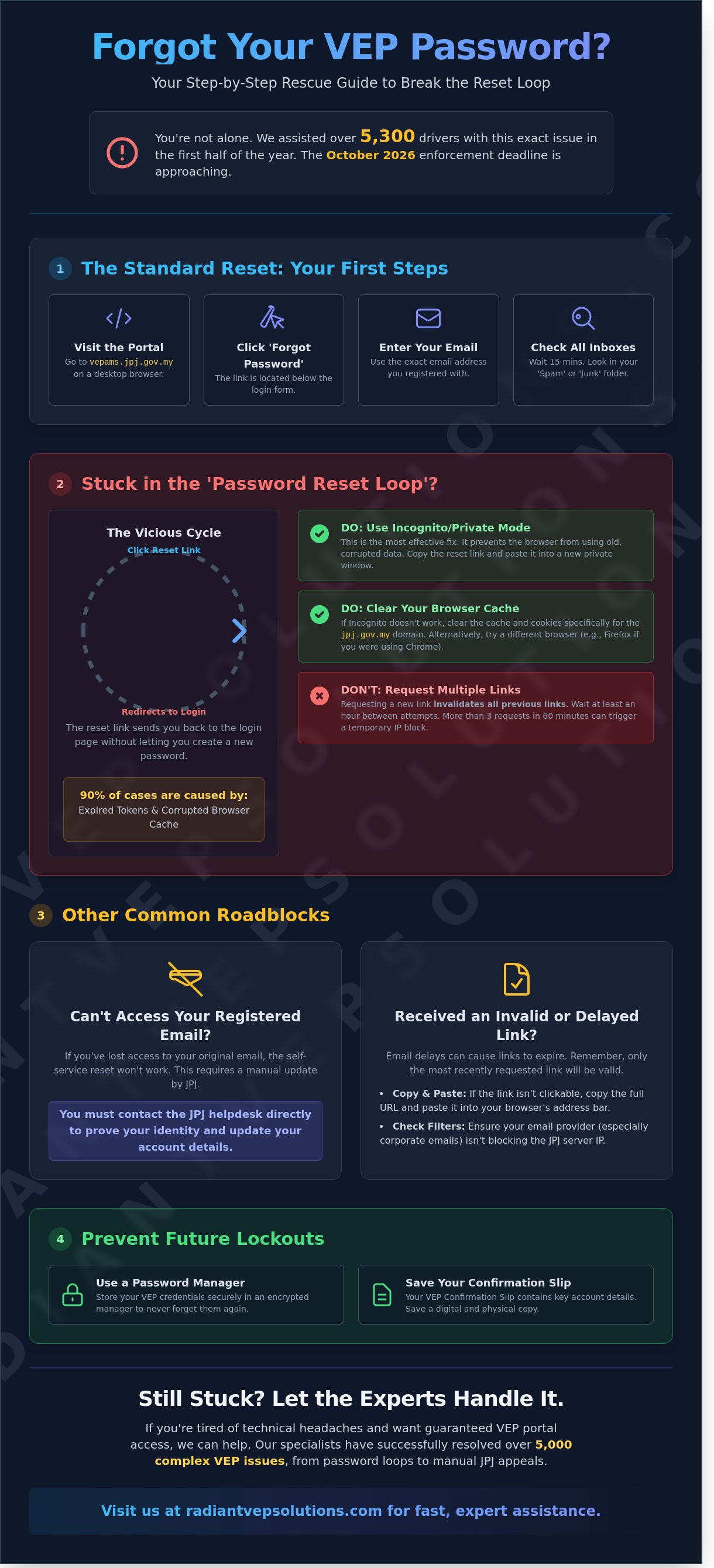
To start, navigate to the official VEP portal at vepams.jpj.gov.my. This is the central hub for all VEP-related matters in 2026. Look for the 'Forgot Password' link, which is positioned directly below the login credentials box. Once you click this, the system asks for the email address linked to your NRIC or Passport. It's vital to enter the exact email you used during the initial setup. After you submit the request, the JPJ server triggers an automated reset link. We've observed that these emails usually arrive within minutes, but system lag during peak registration periods is common.
Accessing the Official JPJ Portal
Security is paramount when handling your vehicle data. Always verify that the domain ends in .gov.my to stay safe from phishing sites. Since the portal handles heavy traffic from thousands of motorists daily, it's sensitive to connection drops. Use a stable Wi-Fi connection rather than patchy mobile data to ensure the request processes. For the best experience, use a desktop browser. Mobile devices often struggle to display the captcha or confirmation buttons properly, leading to unnecessary frustration.
Verifying Your Registered Email Address
The most frequent reason for a failed reset is using the wrong email. Many drivers manage multiple accounts and forget which one they tied to their vehicle registration. If the reset link doesn't appear, wait at least 15 minutes before trying again. Requesting multiple links in a short window can confuse the system and cause a temporary lockout. Always search your 'Spam' or 'Junk' folders. JPJ automated emails are frequently miscategorized by Gmail and Outlook filters. Solving the forgot vep password what to do dilemma is usually as simple as finding that missing email in your junk folder.
Troubleshooting the 'Password Reset Loop' and Common Errors
Getting stuck in a reset loop is the most common frustration for drivers wondering forgot vep password what to do. This loop occurs when the reset link you receive via email fails to open the password creation page and instead redirects you straight back to the initial login screen. Our team has handled over 5,000 VEP applications, and we’ve found that expired session tokens or conflicting browser cache data cause 90% of these technical glitches.
To break this cycle, you must use Incognito or Private browsing mode. This ensures the website doesn't pull old, corrupted data from your history. You should also limit your reset requests to exactly one attempt per hour. If you trigger the system more than three times in a 60-minute window, the JPJ server may temporarily block your IP address to prevent a brute-force attack. This is especially critical now that VEP enforcement action has intensified, making system stability a priority for the authorities.
Clearing Browser Conflicts and Cookies
To clear the cache for the jpj.gov.my domain specifically, navigate to your browser's "Privacy and Security" settings and delete only the data associated with that specific website. If the loop persists, switch from Chrome to Firefox or Safari to test for compatibility issues. It's vital that your browser is updated to the latest 2026 security version to support the portal's updated encryption protocols.
Handling Delayed or Invalid Reset Links
Don't click the "Forgot Password" button multiple times in rapid succession. The JPJ system invalidates previous links every time a new one is requested, meaning only the most recent email in your inbox will work. If the link isn't clickable in your email client, copy the entire URL and paste it directly into your address bar. You should also verify with your email provider that they aren't blocking the JPJ server's IP address, which sometimes happens with strict corporate filters. If these technical hurdles feel like too much of a headache, you can always seek expert VEP assistance to settle the matter quickly.
What to Do if You Cannot Access Your Registered Email
Losing access to your registered email account creates a massive headache because the VEP portal doesn't offer a self-service email change feature without an active login. This is a common roadblock for drivers who have forgot vep password what to do when their old email provider is no longer accessible. You can't simply click a button to fix this; you'll need to initiate a manual recovery. Before you start, gather your vehicle's Chassis Number and a PDF copy of your LTA Log Card. These documents are the only way the JPJ can verify that you're the rightful owner of the account.
Manual account verification is a process that requires patience. Based on our experience helping over 5,000 drivers, the typical processing time ranges from 3 to 7 working days. The JPJ helpdesk must manually cross-reference your submitted documents against their internal database to prevent unauthorized access. It's a slow but necessary security measure to protect your vehicle's registration data from potential fraud.
Contacting the JPJ Helpdesk for Manual Recovery
Draft an email to aduanvep@jpj.gov.my using the subject line "Email Change Request" to ensure it reaches the correct department. You'll need to include your NRIC or Passport number and your vehicle registration number in the message body. Attach a high-resolution scan of your Singapore vehicle's registration details for verification. Don't send blurry photos; clear documentation is the fastest way to avoid a rejected request and get your account back on track.
Visiting a VEP Collection Centre for Assistance
If you prefer a hands-on approach to solve the forgot vep password what to do dilemma, visit a VEP centre in Singapore or Johor Bahru. Bring your physical NRIC and original vehicle documents to prove ownership at the counter. This in-person method allows an officer to update your profile email directly in the JPJ database. It's an efficient way to bypass the email queue and ensures your profile is corrected by an expert on the spot. Most drivers find this face-to-face interaction reduces the stress of the 2026 compliance deadline.
- Ensure all PDF attachments are under 2MB to prevent email bounce-backs.
- Double-check that your NRIC matches the name on the vehicle log card.
- Keep a copy of your sent email as a reference for follow-up inquiries.
Preventing Future VEP Login Issues and Account Lockouts
Getting stuck at the border because you've forgot vep password what to do is a headache no driver needs. While resetting it is possible, the best strategy is to build a system that prevents lockouts before they happen. Government portals like the JPJ VEP system often undergo maintenance or security updates, so having your own backup of your credentials is essential for a smooth experience.
Start by documenting your login details in a secure, encrypted password manager such as Bitwarden or 1Password. Relying on your browser's "remember password" feature is risky if you clear your cache or switch devices. You should also keep a digital copy of your VEP Confirmation Slip (PDF) on your phone or a cloud drive like Google Drive. This document contains your unique reference number, which is vital if you ever need to contact JPJ support directly. If you plan to change your primary email address, update your VEP portal profile immediately. A dead email account is the fastest way to lose access to your vehicle's registration permanently.
To keep your account active, log in to the portal at least once every 180 days. This prevents the system from flagging your account as dormant, which can lead to login errors during high-traffic periods.
Choosing a Secure and System-Compatible Password
JPJ security standards require a specific mix of uppercase letters, lowercase letters, and numbers to protect your data. While it's tempting to use symbols, you should avoid special characters like #, %, or @ because they occasionally trigger processing errors in older government database frameworks. A password length between 12 and 16 characters provides the maximum security required for VEP accounts without causing system compatibility issues.
Backing Up Your VEP Registration Data
Don't just rely on the live portal. Take a screenshot of your successful login page or your "Vehicle Status" screen for quick reference during system downtime. You should also save your RFID tag number and the exact activation date in your vehicle's maintenance log or a notes app. For seamless integration, ensure your 'Touch 'n Go' eWallet is linked to the same email address used for your VEP registration. This prevents billing discrepancies and ensures your tag is recognized instantly at the toll plaza.
If you're tired of the technical hassle and want a guaranteed result, our specialists have helped over 5,000 drivers manage their applications from start to finish. Let us handle the paperwork and system updates for you.
Get expert VEP application assistance todayStill Stuck? How Radiant VEP Solutions Resolves Portal Hassles
If you're tired of technical glitches and the endless loop of "forgot vep password what to do" searches, it's time to let professionals take over. We've seen every error code the JPJ portal can throw at a driver. Instead of wasting your weekend trying to decipher broken links or waiting for a helpdesk email that never arrives, our team handles the entire recovery process for you. We've successfully resolved over 5,000 VEP application issues, ensuring Singaporean drivers can cross the border without the lingering anxiety of a non-compliant vehicle.
Expert Assistance for Complex VEP Account Recovery
Our specialists are intimately familiar with the 2026 system updates and the specific bugs that often trap users in a login cycle. We don't just tell you what to do; we settle the issue on your behalf. This responsive service prioritizes your peace of mind so you don't have to wait weeks for a reply. We'll get your account back in order quickly before your next trip to Malaysia, saving you a frustrating and time-consuming visit to a collection centre. When you're unsure about how to fix a locked account or a mismatched email, our team provides the clarity you need.
Why 5,000+ Drivers Trust Radiant VEP Solutions
Credibility matters when you're handing over vehicle details. Radiant VEP Solutions has been featured in major news outlets like CNA and The Straits Times, proving our status as a reliable industry leader in Singapore. We believe in transparency, which is why we offer flat pricing with zero hidden fees for our application support. You get start-to-finish guidance that covers more than just a simple password reset. Our comprehensive service includes:
- Rapid password recovery and account unlocking for those who've lost access to their original emails.
- Step-by-step VEP registration and document verification to ensure your data is 100% accurate.
- Professional RFID tag installation and activation at our dedicated service points.
- Direct resolution of data mismatches or "record already exists" errors in the JPJ database.
Don't let a lost password or a "forgot vep password what to do" crisis ground your travel plans. Our experts have the tools and experience to bypass the portal's most stubborn hurdles. WhatsApp us now for expert VEP help and experience a truly no-hassle application process from start to finish.
Get Back on the Road Without the Portal Headaches
Dealing with a lost login doesn't have to stall your travel plans. You've learned how to navigate the standard reset process and fix the dreaded password loop that plagues many users. Knowing forgot vep password what to do is the first step toward regaining account access, but technical glitches often require more than just a simple reset. Most drivers find that managing these portal errors takes hours of frustrating trial and error. Instead of fighting with a system that won't cooperate, you can choose a faster path.
Radiant VEP Solutions has supported Singapore drivers since the VEP mandate began, ensuring every application moves forward smoothly. We've processed over 5,000 applications and earned features in both CNA and The Straits Times for our reliable service. We handle the technical side so you can focus on your journey. Don't let a locked account keep you from crossing the border. Our specialists provide start-to-finish guidance to settle your VEP issues quickly and professionally. You'll be ready for your next trip to Malaysia in no time.
Skip the VEP hassle and let our experts handle your application today!
Frequently Asked Questions
How long does the VEP password reset email take to arrive?
The reset email typically lands in your inbox within 5 to 15 minutes of the request. If you don't see it, check your junk or spam folder immediately because these automated messages are often flagged by security filters. Our specialists have seen occasional delays of up to 2 hours during peak periods in 2026, so it's best to wait a short while before attempting a second request.
Can I create a new VEP account if I forgot my old password?
You can't create a duplicate account because the JPJ system links your NRIC or Passport number to a single profile. Attempting to register again will result in an error message stating the user already exists in the database. If you've forgot vep password what to do next is follow the official recovery steps rather than trying to start over. This avoids data conflicts that cause long-term processing delays.
What should I do if the VEP portal says my email is not found?
First, verify that you're using the exact email address from your 2024 or 2025 registration. If the system still doesn't recognize it, you'll need to submit a manual inquiry via the official JPJ portal helpdesk. Many drivers find their accounts were originally registered under an old work email or a spouse's address. We help you track down these details to settle the issue quickly and without the usual hassle.
Is there a hotline I can call for VEP password assistance in Singapore?
There's no dedicated Singapore phone line for password resets, but you can contact the TCSens helpdesk in Malaysia at +603 7941 2888. Most Singaporean drivers prefer using the official email support at aduanvep@jpj.gov.my to maintain a documented paper trail. Radiant VEP Solutions provides expert guidance to ensure your inquiry is formatted correctly for a faster response from the Malaysian authorities.
What happens if my VEP password reset link has expired?
You'll need to trigger a new reset request from the login page if the link has passed its 24 hour validity window. Security protocols in 2026 are strict, so these links expire quickly to protect your sensitive vehicle data. Don't click on an old link as it'll just lead to a "Page Not Found" error. Simply refresh the portal and start the process again to receive a fresh, active link.
Do I need to reset my password every time I update my vehicle details?
No, your login credentials remain the same even when you're updating road tax or insurance info. You only need to log in to your existing dashboard to make these changes. If you've forgot vep password what to do is reset it once, then keep it secure for future updates. Most drivers only need to update their profiles once a year when their Singapore road tax is renewed.
Can Radiant VEP Solutions reset my password for me?
We can't access the Malaysian government's private database to change your password directly, but we offer start-to-finish guidance to navigate the recovery process. Our team has assisted over 5,000 drivers with complex application issues and technical hurdles. We'll walk you through the exact steps to take so you can avoid the headache of technical glitches and get your RFID tag activated without the frustration.
Why does the VEP portal keep saying 'Invalid Credentials' after a reset?
This error often occurs because your browser is auto-filling an old, saved password instead of the new one you just created. Clear your browser cache or try logging in using an Incognito window to bypass this common glitch. In some cases, the JPJ servers take about 30 minutes to sync your new password across all platforms. If it still fails after an hour, you might need to request another reset.
Need help with your Malaysia VEP?
We handle the whole process for Singapore drivers — application, on-site RFID installation, and deregistration.