
How to Use the VEP Portal Singapore: A Step-by-Step Navigation Guide for 2026
Written and reviewed by the Radiant VEP Solutions team.
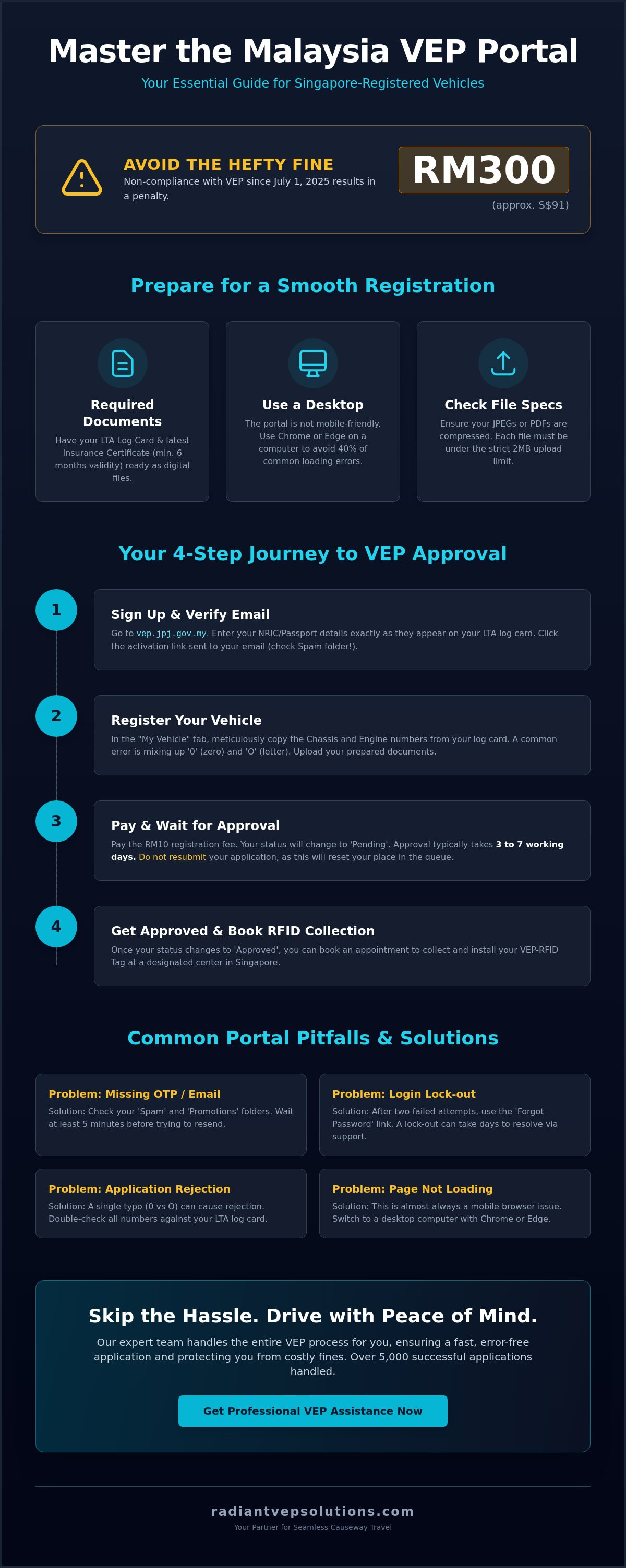
You're minutes away from the Woodlands Checkpoint when you realize your VEP status is still "Pending." Since July 1, 2025, that uncertainty has carried a heavy price; a RM300 (approximately S$91) fine for non-compliance. Learning how to use vep portal singapore shouldn't feel like a high-stakes g...
How do you use the VEP portal? The official Malaysia VEP portal is at vep.jpj.gov.my. You create an account, add your Singapore vehicle, upload your road tax, insurance, log card, and ID, submit the application, and track its status there. This guide walks through every screen of the VEP portal, including the common errors and how to fix them.
If the portal keeps erroring out, we can run the whole thing for you - see our VEP application service and pricing.
You're minutes away from the Woodlands Checkpoint when you realize your VEP status is still "Pending." Since July 1, 2025, that uncertainty has carried a heavy price; a RM300 (approximately S$91) fine for non-compliance. Learning how to use vep portal singapore shouldn't feel like a high-stakes gamble, but with confusing document uploads and missing OTP emails, many drivers find the process incredibly frustrating.
We agree that your time is better spent planning your trip than fighting with a glitchy website. That's why we've put together this expert navigation guide to help you master the Malaysia VEP portal from start to finish. We'll walk you through the precise steps for account setup, document verification, and RFID tag activation. We also include troubleshooting tips for common technical errors, ensuring you secure your appointment and gain total peace of mind before your next drive across the Causeway.
Key Takeaways
- Gather your LTA log card and insurance certificate beforehand to ensure a smooth, error-free registration process on the official JPJ portal.
- Master how to use vep portal singapore by optimizing your browser settings and learning the "save progress" trick to prevent data loss during system timeouts.
- Resolve common technical frustrations like missing OTP emails or verification delays with our specific troubleshooting steps for Singaporean drivers.
- Learn how to monitor your application status and navigate the appointment calendar for RFID tag collection at designated centers in Singapore.
- Discover how professional application assistance can eliminate the hassle of complex forms and protect you from the RM300 non-compliance fine.
Table of Contents
- Getting Started: Accessing the Official VEP Portal (vep.jpj.gov.my)
- Step-by-Step: Registering Your Vehicle on the VEP Portal
- Troubleshooting Common VEP Portal Glitches and Errors
- After the Portal: Booking Your RFID Tag Collection
- Skip the Hassle: Why Professional VEP Assistance is the Smarter Choice
Getting Started: Accessing the Official VEP Portal (vep.jpj.gov.my)
The official Jabatan Pengangkutan Jalan (JPJ) portal is the only gateway for Singapore-registered vehicles to enter Malaysia legally. Since the full enforcement began on July 1, 2025, skipping this step isn't an option. Just like the Autopass Card system facilitates entry into Singapore, the VEP portal manages your credentials for the North. To avoid the headache of a RM300 fine, you need to get this right from the very first click.
Stability is your best friend here. Don't try to register using a smartphone or tablet. The portal's interface is notorious for failing to load document upload fields on mobile browsers. Instead, use a desktop computer running the latest version of Google Chrome or Microsoft Edge. This simple technical choice solves roughly 40% of the "page not loading" errors drivers face. Understanding how to use vep portal singapore effectively begins with a reliable connection and a primary email address that you check daily.
Creating Your VEP Account
Click the "Sign Up" button to begin. You'll need to provide a valid email and your NRIC or Passport details. It's vital to enter these exactly as they appear on your LTA log card. Even a tiny typo can cause the system to reject your application later, leading to weeks of delays. Once you submit the form, look for an activation link in your inbox. If it doesn't arrive within five minutes, check your "Spam" or "Promotions" folders. You cannot proceed without clicking that link to verify your identity.
Portal Login and Dashboard Overview
After logging in, you'll meet the main dashboard. It's divided into two primary areas: "My Profile" and "My Vehicle." Use the "My Profile" section to update your contact details or change your password. If you ever lose access, use the "Forgot Password" link immediately. Don't guess your password more than twice; the system often locks accounts after three failed attempts. This lock-out can take days to resolve through official support channels. The "My Vehicle" tab is where you'll spend most of your time. This is where you'll input your chassis and engine numbers. Keeping your data secure is simple. Never share your login credentials and always log out when using public Wi-Fi. At Radiant VEP Solutions, we've handled over 5,000 successful applications, and we know that a clean, accurate setup here saves hours of frustration later.
Step-by-Step: Registering Your Vehicle on the VEP Portal
With your account active, you're ready for the most critical phase: vehicle registration. This is where many drivers hit a wall due to minor data entry errors. Learning how to use vep portal singapore effectively requires high attention to detail, especially when matching your digital inputs to your physical documents. Accuracy here is the difference between a 3 day approval and a month long headache. The Vehicle Entry Permit is a legal tracking tool for foreign cars that monitors entry and exit across Malaysian borders.
Document Preparation Checklist
Before you open the registration form, have your digital files ready. You'll need your NRIC, your latest insurance certificate, and your LTA log card. You can download your log card quickly by logging into the OneMotoring website with your Singpass. Ensure your insurance is valid for at least six months to avoid rejection. The portal has a strict 2MB limit for uploads, so you may need to compress your JPEGs or PDFs. This process mirrors the precision needed for LTA's Autopass card requirements, where document clarity is non-negotiable. If these technical hurdles feel like a hassle, our expert VEP application assistance can handle the entire document formatting process for you.
Navigating the Vehicle Info Form
The form asks for your chassis and engine numbers. Don't rely on memory; copy these directly from your LTA log card. A common mistake is confusing the digit '0' with the letter 'O', which triggers an immediate system mismatch. You'll also need to select your vehicle category. Most drivers will select 'Private', but if your car is under a company name, ensure you have the ACRA business profile ready for upload. Once you pay the RM10 registration fee, your status will change to 'Pending'.
Approval typically takes 3 to 7 working days. During this time, resist the urge to resubmit your application, as this often resets your position in the queue. Check the portal daily to see if the status shifts to 'Approved'. Once it does, you're cleared for the final step: securing your RFID tag. This proactive approach saves you from the RM300 (roughly S$91) fine currently enforced at the border. By following these steps, you'll move through the system with the confidence of a seasoned traveler.
Troubleshooting Common VEP Portal Glitches and Errors
Even with your documents ready, the technical side of how to use vep portal singapore can be unpredictable. The portal often struggles under high traffic, leading to frustrating delays. One of the most frequent issues is the "OTP Not Received" glitch. If your verification code hasn't arrived within 10 minutes, don't keep clicking "Resend" as this often jams the verification sequence. Instead, whitelist the jpj.gov.my domain in your email settings and check your "All Mail" or "Spam" folders. If that fails, wait at least two hours before trying again to let the server cache clear.
System timeouts are another hurdle. The portal is designed to log users out after 15 minutes of inactivity. This often happens while you're busy resizing files or looking for your engine number. To prevent data loss, click the "Save" button at the bottom of each tab before moving to the next. If you encounter the "Vehicle Already Registered" error, it usually means the previous owner did not deregister the car. This is a common issue for second hand car buyers in Singapore. You'll need to upload your current LTA log card to prove ownership and wait for the system to manually reset the record.
Fixing Submission Errors
If your "Submit" button is greyed out, it's rarely a system crash. It usually means a mandatory field or a tiny "Terms and Conditions" checkbox has been missed. Scrutinize every tab for a red asterisk. If you receive a "File Too Large" error, remember the strict 2MB limit. Don't just lower the resolution until it's blurry; use a dedicated PDF compressor to maintain text clarity. If you've already submitted and noticed a mistake, the portal won't let you edit. You'll have to wait for the "Rejected" status to appear before you can fix the error and resubmit.
Contacting JPJ Support
When the portal simply won't cooperate, you'll need to reach out to the official JPJ helpdesk. Provide your NRIC, vehicle plate number, and a screenshot of the specific error code. In 2026, typical response times for technical tickets range from 5 to 7 working days. Because these delays can put you at risk of the RM300 non-compliance fine, many drivers choose professional assistance. Our specialists have processed over 5,000 applications and know exactly how to bypass these bugs, saving you the headache of waiting on a support ticket. We handle the technical glitches so you don't have to.
After the Portal: Booking Your RFID Tag Collection
Once your application status shifts from "Processing" to "Approved," the portal finally unlocks the appointment module. This is the final stage of your digital journey. Mastering how to use vep portal singapore effectively means knowing how to snag a slot before they vanish. High demand often leaves the calendar looking quite full, so checking the portal at midnight when new slots are released is a pro tip used by many frequent travelers.
You have three main options for receiving your tag: collection at a Singapore centre, collection in Johor Bahru, or postal delivery. While postal delivery sounds convenient, many drivers prefer assisted installation. A poorly placed tag won't trigger the sensors at the toll plaza correctly. This can lead to the very "hassle" at the checkpoint we want to avoid. If you choose collection, you'll pay a fee of RM10 (approximately S$3) for the tag itself, though service fees at Singapore centres will apply.
The Appointment Booking Interface
The calendar interface is straightforward but requires quick action. Select your preferred location and then browse for an available date and time. If your schedule changes, you must reschedule at least 24 hours in advance through the portal dashboard. Don't simply miss your slot. The system often locks users out of rebooking for several days if they are a "no-show." When choosing your installation type, "Self-Installation" means the tag is mailed to your Singapore address. "Assisted Installation" involves driving to a designated centre where a specialist handles the fitment for you.
Collection Centres in Singapore
In 2026, the TCSens VEP Centre remains the primary hub for Singaporean drivers, alongside satellite locations in Woodlands and Jurong. To avoid long queues, aim for mid-week appointments between 10:00 AM and 2:00 PM. Before you arrive, ensure you have downloaded the Touch ‘n Go eWallet on your smartphone. You must link your VEP RFID tag to this account to pay the RM20 Road Charge automatically at the border. This link is what makes the entire system "cashless" and efficient.
Bring these items to your appointment to ensure a smooth process:
- A printed copy of your VEP PDF confirmation slip
- Your NRIC or Passport
- A copy of your vehicle’s latest insurance cover note
If the thought of refreshing the appointment page daily feels like a chore, we can handle it for you. Our team provides comprehensive VEP appointment booking assistance to get you on the road faster. We track the latest slot releases and manage the technical side, ensuring your cross-border travels remain stress-free from start to finish.
Skip the Hassle: Why Professional VEP Assistance is the Smarter Choice
We've explored the technical maze of how to use vep portal singapore, from navigating server timeouts to resizing PDFs. While following these steps can lead to a successful application, the DIY route remains a significant time commitment. For many Singaporean drivers, the constant threat of a RM300 (approximately S$91) non-compliance fine makes the margin for error too slim. That's why we created a service designed to eliminate the "hassle" entirely. We believe your time is better spent planning your trip than fighting with a government website.
The "Radiant Way" focuses on rapid, expert results. We manage the entire portal workflow, so you don't have to spend hours checking for email verification links or fighting with greyed-out "Submit" buttons. Our specialists understand the 2026 portal interface inside and out. We ensure every chassis number and engine detail matches your LTA records perfectly. This precision has allowed us to help over 5,000 drivers cross the border with total confidence. Our transparent, flat pricing model means you'll never face hidden fees or surprise charges during the process.
Our Comprehensive VEP Service
Our team provides start-to-finish guidance that covers more than just a simple form submission. We handle account creation, document verification, and the often frustrating task of booking a tag collection appointment in Singapore. If you've recently purchased a second-hand car and encountered the "Vehicle Already Registered" error, we know exactly how to settle that with the JPJ helpdesk. We also assist with vehicle deregistration and RFID activation, ensuring your Touch 'n Go eWallet is correctly linked. Our track record with 5,000+ applications makes us the most trusted choice for drivers who value their time and peace of mind.
Ready to Secure Your VEP?
Starting your application shouldn't be a headache. To begin, simply book a session with our specialists and have your LTA log card and insurance certificate ready. We'll handle the technical uploads and portal navigation on your behalf. You'll receive clear updates at every stage, from "Pending" to "Approved." Don't let a glitchy website keep you from your weekend getaway or business trip. WhatsApp our specialists now for a stress-free VEP application! We're here to provide the efficient, professional support you need to get back on the road quickly.
Secure Your Cross-Border Travel Today
We've covered the essential steps for mastering the system, from initial account setup to final RFID activation. Knowing how to use vep portal singapore effectively means more than just filling out a form; it requires precise document preparation and the patience to navigate technical glitches. With the RM300 (roughly S$91) fine now strictly enforced, getting your application right the first time is the only way to avoid unnecessary stress at the Causeway.
If the portal's "Pending" status or missing OTP emails feel like a headache you'd rather skip, we're here to help. Radiant VEP Solutions has already processed over 5,000 successful applications for Singaporean drivers. Our expertise has been featured in CNA and The Straits Times, providing a reliable alternative to the DIY struggle. We offer flat pricing with no hidden fees, ensuring you get expert results without any surprises. Let Radiant VEP Solutions handle your application - Book Now! and enjoy your next drive across the border with total peace of mind. You're just one step away from a hassle free journey.
Frequently Asked Questions
How do I check my VEP application status on the portal?
Log in to the official JPJ VEP portal and navigate directly to the "My Vehicle" tab on your dashboard. Your current status will be clearly displayed as "New," "Pending," or "Approved" next to your vehicle plate number. Check this status daily after the initial 3 to 7 working day processing window has passed to stay updated on your progress.
What should I do if I forgot my VEP portal password?
Click the "Forgot Password" link on the main login page to trigger an automated reset link to your registered email address. You'll need to enter your email and NRIC to verify your identity. If the reset email doesn't arrive within 10 minutes, check your spam folder. Avoid more than two failed login attempts to prevent a temporary security lockout on your account.
Can I register multiple cars under one VEP portal account?
Yes, you can register and manage multiple vehicles under a single user account. This feature is particularly helpful for households with several cars or for small business owners. You'll need to upload the specific LTA log card and insurance certificate for each individual vehicle you add to the system. Each car will receive its own unique RFID tag once approved.
How long does it take for the VEP portal to approve an application?
Approval typically takes between 3 to 7 working days once you've successfully submitted all required documents. During peak travel periods, this processing time can extend to 14 days. Don't resubmit your application while it's still "Pending" as this often resets your position in the queue. Patience is key during this administrative phase to ensure your data is processed correctly.
Why is the VEP portal not sending me an OTP?
OTP delays are usually caused by server congestion or strict email provider filters. Wait at least 15 minutes before requesting a new code to avoid jamming the system. It's also helpful to whitelist the jpj.gov.my domain in your email settings. This ensures the portal's automated messages aren't blocked by your service provider, allowing you to complete your verification without further hassle.
What documents do I need to upload to the VEP portal in 2026?
You must upload a clear copy of your NRIC, your current insurance cover note, and the latest LTA log card. Understanding how to use vep portal singapore effectively means ensuring all files are under the 2MB size limit. Your insurance must be valid for at least 6 months from the date of your application to meet the mandatory Malaysian requirements for foreign vehicles.
Can I drive into Malaysia if my VEP status is still "Pending"?
You can enter Malaysia, but you risk receiving a RM300 (roughly S$91) fine for non-compliance. Since full enforcement began on July 1, 2025, authorities have been very strict with foreign registered cars. It's much safer to wait for your final approval and complete your RFID tag installation. This proactive approach gives you total peace of mind and avoids costly penalties at the border.
How do I update my car insurance details on the VEP portal?
Log in to your account and navigate to the "My Vehicle" section to upload your renewed insurance certificate. You must keep these details current to ensure your VEP remains valid for its full five year lifespan. The portal doesn't automatically sync with LTA records for insurance updates. Manually refreshing this information takes just a few minutes and keeps your cross border credentials in good standing.
Need help with your Malaysia VEP?
We handle the whole process for Singapore drivers — application, on-site RFID installation, and deregistration.